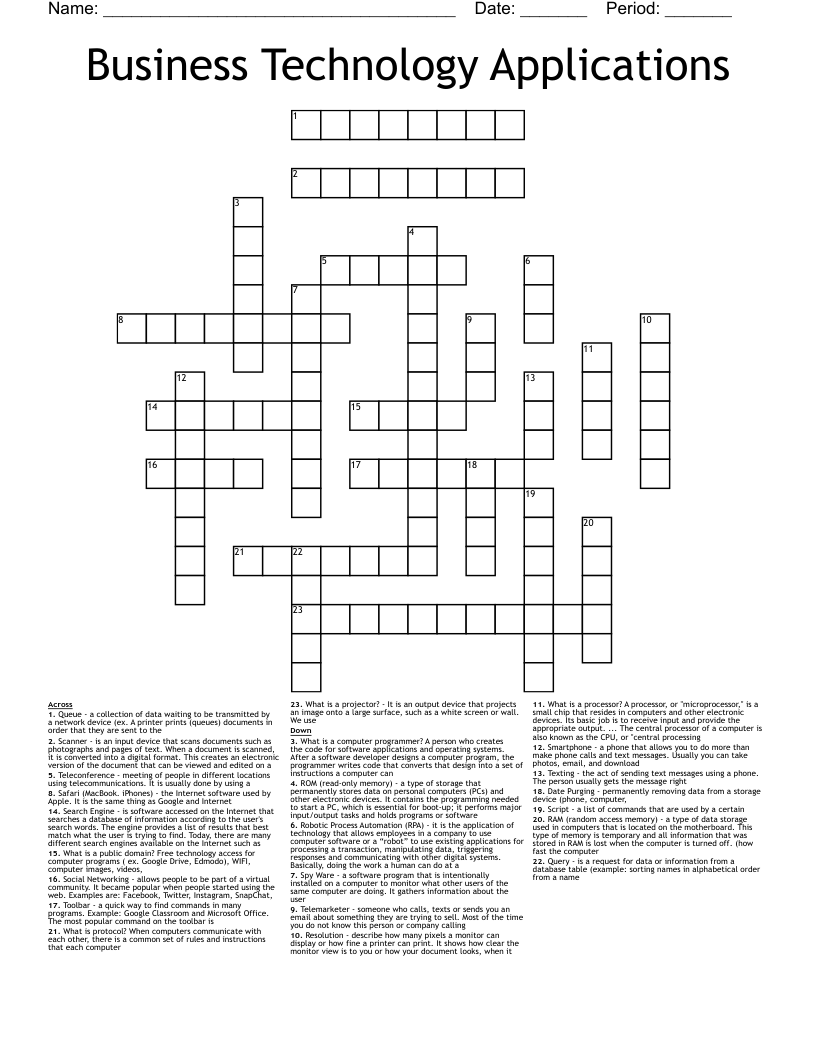
Business Technology Applications Crossword
This printable crossword puzzle has 23 clues. Answers range from 4 to 13 letters long. This crossword is also available to download as a Microsoft Word document or a PDF.
Description
What is a computer programmer? A person who creates the code for software applications and operating systems. After a software developer designs a computer program, the programmer writes code that converts that design into a set of instructions a computer can
What is a processor? A processor, or "microprocessor," is a small chip that resides in computers and other electronic devices. Its basic job is to receive input and provide the appropriate output. ... The central processor of a computer is also known as the CPU, or "central processing
What is a projector? - It is an output device that projects an image onto a large surface, such as a white screen or wall. We use
What is protocol? When computers communicate with each other, there is a common set of rules and instructions that each computer
What is a public domain? Free technology access for computer programs ( ex. Google Drive, Edmodo), WIFI, computer images, videos,
Date Purging - permanently removing data from a storage device (phone, computer,
Query - is a request for data or information from a database table (example: sorting names in alphabetical order from a name
Queue - a collection of data waiting to be transmitted by a network device (ex. A printer prints (queues) documents in order that they are sent to the
RAM (random access memory) - a type of data storage used in computers that is located on the motherboard. This type of memory is temporary and all information that was stored in RAM is lost when the computer is turned off. (how fast the computer
ROM (read-only memory) - a type of storage that permanently stores data on personal computers (PCs) and other electronic devices. It contains the programming needed to start a PC, which is essential for boot-up; it performs major input/output tasks and holds programs or software
Robotic Process Automation (RPA) - it is the application of technology that allows employees in a company to use computer software or a “robot” to use existing applications for processing a transaction, manipulating data, triggering responses and communicating with other digital systems. Basically, doing the work a human can do at a
Resolution - describe how many pixels a monitor can display or how fine a printer can print. It shows how clear the monitor view is to you or how your document looks, when it
Safari (MacBook. iPhones) - the Internet software used by Apple. It is the same thing as Google and Internet
Scanner - is an input device that scans documents such as photographs and pages of text. When a document is scanned, it is converted into a digital format. This creates an electronic version of the document that can be viewed and edited on a
Script - a list of commands that are used by a certain
Search Engine - is software accessed on the Internet that searches a database of information according to the user's search words. The engine provides a list of results that best match what the user is trying to find. Today, there are many different search engines available on the Internet such as
Smartphone - a phone that allows you to do more than make phone calls and text messages. Usually you can take photos, email, and download
Social Networking - allows people to be part of a virtual community. It became popular when people started using the web. Examples are: Facebook, Twitter, Instagram, SnapChat,
Spy Ware - a software program that is intentionally installed on a computer to monitor what other users of the same computer are doing. It gathers information about the user
Telemarketer - someone who calls, texts or sends you an email about something they are trying to sell. Most of the time you do not know this person or company calling
Teleconference - meeting of people in different locations using telecommunications. It is usually done by using a
Texting - the act of sending text messages using a phone. The person usually gets the message right
Toolbar - a quick way to find commands in many programs. Example: Google Classroom and Microsoft Office. The most popular command on the toolbar is